The Android log was enormous. It began with graphics drivers, class loaders and telemetry, then kept going until the useful signal had disappeared beneath several thousand lines of normal application noise.
All I wanted was to reach my EndeavourOS desktop from my phone with Microsoft’s Windows App. KRDP was already part of the KDE setup, and the same server was reachable from a laptop. I did not want to replace the native server with xrdp or install an unrelated remote-control service just to make one client happy.
The first real clue was much smaller than the log: KRDP’s certificate expired after one day.
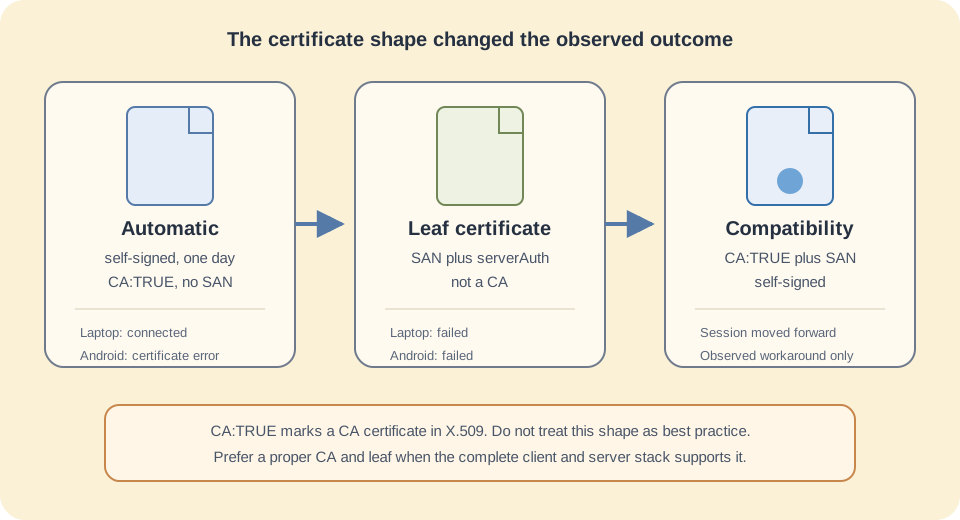
The certificate KRDP made for itself
I inspected the automatically generated file:
openssl x509 \
  -in "$HOME/.local/share/krdpserver/krdp.crt" \
  -noout -subject -issuer -dates -text
The interesting parts were:
- a 2048-bit RSA key;
- a one-day lifetime;
- a self-signed issuer and subject;
Basic Constraints: critical, CA:TRUE;- no Subject Alternative Name for the host or IP address;
- no Extended Key Usage limiting it to server authentication.
That was not an accident in my package. KRDP’s own configuration code currently invokes openssl req -new -x509 ... -days 1 when it generates the certificate, and its documentation permits supplying a different certificate and key. The same documentation also says that Microsoft’s Android client is a known non-working client, while FreeRDP is the main tested client. That makes this an interoperability investigation, not a generally supported recipe. See the KRDP source and compatibility notes and the certificate-generation code.
My first instinct was to make the certificate more conventional.
The proper certificate that made things worse
I generated a long-lived self-signed server certificate with:
- a DNS Subject Alternative Name;
- an IP Subject Alternative Name;
Extended Key Usage: serverAuth;- no CA capability;
- a 4096-bit RSA key.
That looked much better in openssl x509 -text. It was also a better description of what the key was meant to do. OpenSSL’s documentation is explicit: CA:TRUE identifies a CA certificate, while an end-entity certificate should use CA:FALSE or omit the extension. serverAuth identifies TLS server authentication. The full extension syntax is in the OpenSSL X.509 v3 configuration documentation.
Then both clients stopped connecting.
That failure was useful. The Android client had not merely disliked the missing SAN. My standards-shaped leaf certificate had changed something KRDP, FreeRDP underneath it, or the client negotiation expected. The laptop, which had worked before, gave me the A/B test I needed.
The compatibility certificate
The experiment that finally moved the connection forward was deliberately conservative: keep the shape of KRDP’s working self-signed certificate, but add the names I actually used to connect.
This public version uses an example-only hostname and an address from the TEST-NET-1 range. Replace both values with the private DNS name and address of your own KRDP host. It creates the new files without overwriting KRDP’s automatic files:
#!/usr/bin/env bash
set -euo pipefail
umask 077

cert_dir="$HOME/.local/share/krdpserver"
cert_name="krdp_compat"
rdp_dns="desktop.example.internal"
rdp_ip="192.0.2.52"

install -d -m 700 "$cert_dir"

cat > "$cert_dir/${cert_name}.cnf" <<EOF
[req]
default_bits = 2048
prompt = no
default_md = sha256
distinguished_name = dn
x509_extensions = krdp_compat

[dn]
CN = ${rdp_dns}

[krdp_compat]
basicConstraints = critical,CA:TRUE
subjectKeyIdentifier = hash
authorityKeyIdentifier = keyid:always,issuer:always
subjectAltName = @alt_names

[alt_names]
DNS.1 = ${rdp_dns}
IP.1 = ${rdp_ip}
EOF

openssl req -new -x509 -nodes -days 3650 \
  -config "$cert_dir/${cert_name}.cnf" \
  -keyout "$cert_dir/${cert_name}.key" \
  -out "$cert_dir/${cert_name}.crt"

chmod 600 "$cert_dir/${cert_name}.key"

openssl x509 \
  -in "$cert_dir/${cert_name}.crt" \
  -noout -subject -issuer -dates \
  -ext basicConstraints -ext subjectAltName
I then disabled automatic certificate generation in KDE’s Remote Desktop settings and selected:
~/.local/share/krdpserver/krdp_compat.crt
~/.local/share/krdpserver/krdp_compat.key
After applying the settings, the current upstream service can be restarted with:
systemctl --user restart app-org.kde.krdpserver.service
Package naming has changed over time. If that unit does not exist, find the installed name instead of guessing:
systemctl --user list-unit-files '*krdp*'
The connection moved past the certificate problem. The next annoyance was scroll-wheel sensitivity, which was a much nicer problem to have than a session that never opened.
Why this is a workaround, not certificate advice
I need to be precise about what the experiment proved. It proved that this certificate shape restored compatibility in my KRDP setup on 9 September 2025. It did not prove that CA:TRUE belongs on RDP server certificates, that every Android release accepts it, or that a ten-year certificate is the best security design.
In fact, the opposite is true. A proper small public-key infrastructure has two different jobs:
- A private root CA has
CA:TRUEand is kept safe. - That CA signs a server leaf with
CA:FALSE, the correct SANs andserverAuth.
Clients trust the root and validate the leaf. My compatibility certificate collapses both roles into one self-signed file because that matched the behavior I observed. Do not install it as a generally trusted root CA on the phone or laptop. Doing so gives a server key authority it should not have.
A ten-year lifetime also increases the time a stolen private key remains useful. I chose it because this machine was likely to be reinstalled before the certificate expired, but that convenience has a cost. A shorter certificate with renewal automation is the better long-term design.
Keep the blast radius small
KRDP listens on the network and controls an already logged-in desktop. Its own documentation warns that the physical session remains unlocked during remote use. I therefore treat it as a trusted-LAN or VPN service, not something to expose directly to the internet.
At minimum:
- allow TCP 3389 only from the LAN or VPN subnet in the host firewall;
- keep the private key readable only by its owner;
- use a unique KRDP password;
- verify the presented fingerprint again after regenerating the certificate;
- remove the workaround and retest automatic or properly signed certificates after KRDP or the Android client is upgraded.
You can print a SHA-256 fingerprint with:
openssl x509 \
  -in "$HOME/.local/share/krdpserver/krdp_compat.crt" \
  -noout -fingerprint -sha256
The most polished-looking certificate in the directory was not the one the whole stack could use. The ugly one-day certificate revealed KRDP’s working baseline. The failed leaf certificate separated a server-side compatibility problem from an Android-only theory. Only then did the hybrid experiment make sense.
That is the useful method here: preserve the known-good shape, change one property at a time, test with a second client, and keep standards compliance separate from observed compatibility. The certificate that worked was not more correct. It was simply a better witness.
Buy Me a Coffee