
The cluster looked healthy until I clicked Shell.
Both Proxmox nodes were online on their new management subnet. Corosync had recovered. The web interface opened. Then the terminal proxy waited, timed out, and revealed the address it was actually trying to reach: the old IP.
failed waiting for client: timed out
termproxy ... ssh ... root@<old-node-ip> ... failed: exit code 1
I had moved the cluster network, but Proxmox was still carrying one part of the old map.
First, the unsupported part
The current Proxmox VE administration guide says nodes should be installed with their final hostname and IP configuration and that changing a clustered node’s hostname or IP after creation is not supported.
That sentence changes how this article should be read. This is a recovery record from my two-node homelab, not a vendor-supported migration procedure. For a production cluster, the supported route is to plan final addresses before joining nodes or to rebuild and rejoin them according to Proxmox guidance.
If I had to repeat this recovery, I would require:
- direct console or out-of-band access to both nodes;
- current guest and configuration backups;
- a maintenance window with migrations and scheduled backups stopped;
- a clear record of old and new addresses;
- no active HA action that could fence a node while cluster communication changes;
- one node changed and verified at a time.
Two-node quorum makes improvisation especially risky. I did not use pvecm expected 1 as a casual way around a read-only cluster filesystem. Lowering the expected vote count while another node might still write can create split-brain conditions. If quorum recovery is required, I want both consoles in front of me and I want to know exactly which node is authoritative before changing votes.
The example map
The addresses below come from the ranges reserved for documentation. They show the shape of the move without publishing my internal network.
| Node | Old management address | New management address |
|---|---|---|
node-a | 192.0.2.20 | 198.51.100.20 |
node-b | 192.0.2.21 | 198.51.100.21 |
Before touching cluster configuration, I recorded the state from both consoles:
hostname --short
ip -br address
ip route
getent hosts node-a
getent hosts node-b
pvecm status
pvecm nodes
The point was not merely to see the new address somewhere. The old address had to be absent from interfaces and routes, and both names had to resolve consistently on both nodes.
Two Corosync files, one authority
My first Corosync edit appeared to work and then reverted after reboot. The reason was simple: I had treated the runtime copy as the source.
Proxmox keeps these two paths:
/etc/pve/corosync.conf       cluster copy in pmxcfs
/etc/corosync/corosync.conf  local runtime copy
Only the first is authoritative. Proxmox’s Corosync configuration guidance says that editing /etc/pve/corosync.conf propagates to the local copy, not the other way around. It also says to edit a copy and always increment config_version.
On the quorate node, I made an off-cluster backup and a working copy:
cp /etc/pve/corosync.conf /root/corosync.conf.before-subnet-move
cp /etc/pve/corosync.conf /etc/pve/corosync.conf.new
nano /etc/pve/corosync.conf.new
The relevant part looked like this after substituting the new documentation addresses:
totem {
    # Keep the existing settings.
    config_version: 6
}

nodelist {
    node {
        name: node-a
        nodeid: 1
        ring0_addr: 198.51.100.20
    }
    node {
        name: node-b
        nodeid: 2
        ring0_addr: 198.51.100.21
    }
}
I changed only the addresses already present in my file and raised the existing config_version. I did not paste an entire example over the real configuration. Vote counts, node IDs, link definitions, crypto settings, and other local details must survive the edit.
Before replacing the live file, I used Corosync’s documented -t test mode to validate the copy, then saved the last live version separately:
corosync -t -c /etc/pve/corosync.conf.new
cp /etc/pve/corosync.conf /root/corosync.conf.last-live
mv /etc/pve/corosync.conf.new /etc/pve/corosync.conf
Proxmox documents that compatible Corosync changes are picked up automatically when the cluster file changes. I watched instead of restarting both nodes together:
journalctl -b -u corosync --no-pager
pvecm status
pvecm nodes
If a service restart is needed during recovery, I do it on one node, verify quorum and membership from the other console, then continue. Restarting Corosync everywhere at once removes the working side of the bridge while I am still standing on it.
Corosync was healthy, management was not
After the cluster link recovered, the GUI still tried the old IP for node-to-node shell access. That seemed contradictory until I separated cluster membership from management transport.
Proxmox uses Corosync for cluster communication, but it also uses SSH tunnels for GUI shell and console proxying, secure migration, and storage replication. That split is described in the administration guide’s Role of SSH in Proxmox VE Clusters section.
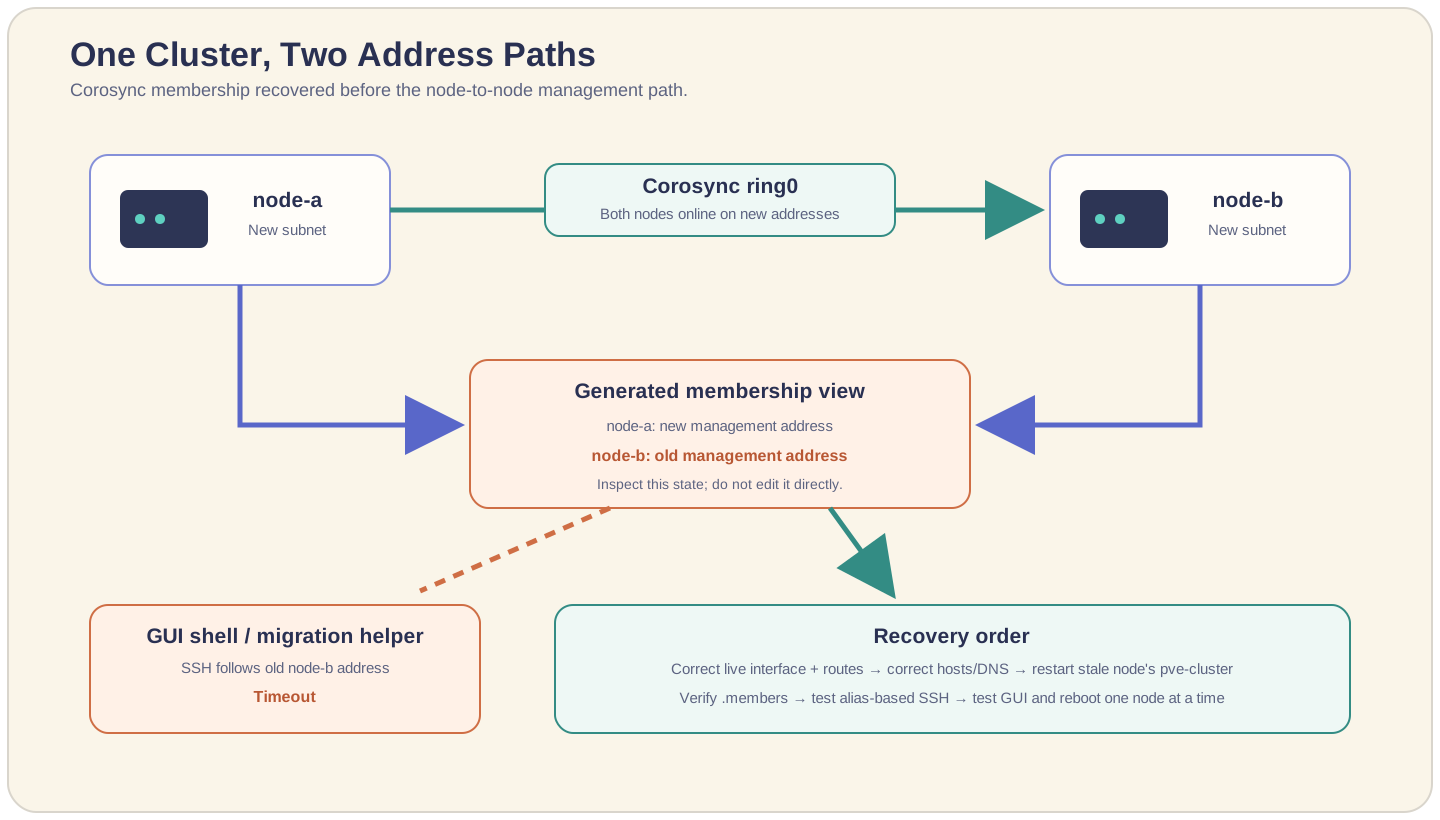
The generated membership view exposed the mismatch:
cat /etc/pve/.members
In my case, both nodes were marked online, but one entry still published the old management address. I did not edit .members. It is generated state, and a manual edit would treat the symptom as configuration.
Instead, I checked the node that was advertising the stale address:
hostname --short
ip -br address
ip route | grep -E '192\.0\.2\.|198\.51\.100\.'
getent hosts node-a
getent hosts node-b
cat /etc/hosts
The local files on both nodes needed to agree:
198.51.100.20 node-a
198.51.100.21 node-b
Any old mapping had to be removed from /etc/hosts, local DNS, and the live interface configuration. The Proxmox network guide recommends applying network changes through the GUI or ifreload -a with ifupdown2 because a wrong live network edit can make the node unreachable.
Once the affected node had only its new address and name resolution returned only the new mapping, I restarted its cluster filesystem service from the local console:
systemctl restart pve-cluster
Then I checked the generated state again from both nodes:
cat /etc/pve/.members
pvecm status
That was the turning point. The stale node entry changed to the new management IP, and the GUI stopped constructing SSH commands toward the old subnet.
This is an observation from the recovery, not a guarantee that pve-cluster alone repairs every stale address. I restarted it only after proving that the live interfaces, routes, /etc/hosts, and resolver output were correct. Otherwise it could simply republish the same mistake.
Check SSH without erasing trust blindly
Because the physical machines and their SSH host keys had not changed, I did not want to delete every known-hosts file and accept whatever answered next. I first tested the same alias-based shape Proxmox uses:
ssh -o BatchMode=yes \
  -o HostKeyAlias=node-b \
  root@node-b /bin/true
No output and a zero exit code meant the non-interactive path worked. If an obsolete address entry still conflicted, I backed up the specific file before removing only that address:
cp /root/.ssh/known_hosts /root/.ssh/known_hosts.before-subnet-move
ssh-keygen -f /root/.ssh/known_hosts -R 192.0.2.21
Modern Proxmox releases use explicit host-key pinning for cluster SSH. Older installations can have a system known-hosts path linked into the cluster filesystem, so I inspect paths with readlink -f before changing them. A blanket rm is not a repair plan.
I then tested the user-facing services:
- open each node shell from the other node’s web interface;
- open one guest console on each node;
- run the non-interactive SSH test in both directions;
- inspect migration and replication targets without starting a production move;
- confirm scheduled backup storage is reachable;
- reboot one node, wait for full membership, then test again before rebooting the other.
My recovery order
The order that finally made sense was:
- Put the new addresses on the actual interfaces and remove the old ones.
- Make hostname resolution identical on both nodes.
- Edit only
/etc/pve/corosync.conf, using a validated copy and a higherconfig_version. - Verify Corosync membership before touching the next layer.
- Inspect generated
.membersstate rather than editing it. - Restart
pve-clusteronly on the node still publishing stale management state. - Verify alias-based SSH, GUI shells, consoles, migration paths, and reboots.
The mistake was thinking there was one cluster address. There were at least two relationships to restore: Corosync needed a route for membership, while Proxmox management tools needed a current node address for SSH.
The cluster had not forgotten its new home. It had simply kept the old address in one pocket.
Buy Me a Coffee