The share could move a backup at 156 MiB/s, yet clicking it in Proxmox made the interface sit still for ten seconds.
That contradiction was the whole mystery. My two-node cluster had used the same TrueNAS dataset over SMB for ISO images and backups. It worked beautifully, except for what it did when nobody was moving a file: TrueNAS recorded a constant stream of successful SMB activity. The audit workload hovered above 280 KiB/s, close to 24 GiB every day.
Disabling the CIFS storage entry in Proxmox made the TrueNAS write graph fall immediately. Gaps appeared where the constant writes had been. That was the useful proof. The SMB share itself was not broken; the cluster’s routine storage polling was enough to keep the audit machinery busy.
NFS looked like the clean answer. Then it introduced a different kind of noise: silence in the browser while I waited for the storage page to open.
Fast data, slow questions
The first backup over NFS completed successfully:
Total bytes written: 2.5 GiB
Throughput:          156 MiB/s
Archive size:        732 MB
Elapsed:             29 seconds
That ruled out the easy story about a weak NAS or a saturated network. Direct access was just as convincing:
| Operation | Observed time |
|---|---|
| List the NFS root | 0.012 s |
| List the backup directory | 0.029 s |
| Count 53 backup files | 0.005 s |
Read capacity with df | 0.002 to 0.005 s |
Read filesystem data with stat -f | 0.002 s |
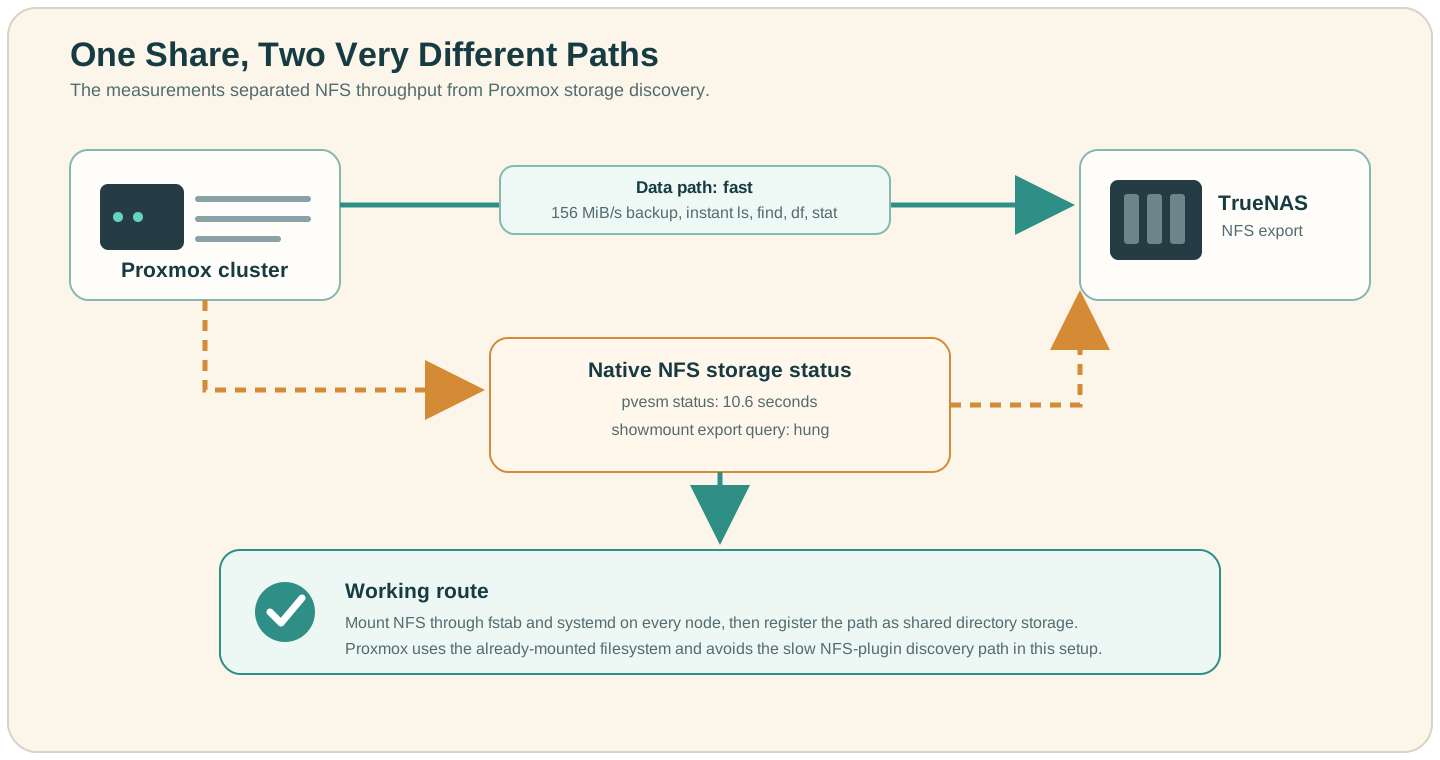
pvesm status --storage <storage-id> | 10.6 s |
The files were fast. The filesystem statistics were fast. Only the question asked through Proxmox’s storage layer was slow.
That distinction matters because the Proxmox NFS backend does more than expose a mounted directory. The official storage documentation says it can test whether the server is online and query the server for exported shares. It is based on the directory backend, but it also owns the NFS-specific discovery and mount work.
Measuring each layer
I ran the tests from each Proxmox node. The placeholders below deliberately keep my internal addresses and paths out of the article.
findmnt /mnt/pve/<storage-id> -o SOURCE,FSTYPE,OPTIONS

time ls -la /mnt/pve/<storage-id>
time ls -la /mnt/pve/<storage-id>/dump >/dev/null
time find /mnt/pve/<storage-id>/dump -maxdepth 1 -type f | wc -l

time df -P /mnt/pve/<storage-id>
time stat -f /mnt/pve/<storage-id>
time pvesm status --storage <storage-id>
The useful discipline here is to avoid changing mount options before identifying the slow boundary. A fast ls does not prove that statfs, export discovery, DNS, or the storage plugin will be fast. In my case, even df and stat -f were instant, which pushed the investigation above the mounted filesystem.
The next pair of commands changed the shape of the problem:
timeout 5 showmount -e <truenas-ip>
timeout 5 rpcinfo -p <truenas-ip>
The original
call hung long enough that the terminal stopped being useful. Adding timeout made later tests recoverable. NFSv4 file access could still work while this older RPC and export-discovery route failed or waited.
That split made the fault deceptive: the mounted NFSv4 data path and the RPC service used for export discovery can have different reachability and timeout behavior.
TrueNAS exposes separate NFS protocol and service controls, including mountd, rpc.statd, and rpc.lockd settings; its NFS service documentation recommends leaving defaults alone unless a specific change is required.
I did not trace the exact slow syscall inside pvesm, so I cannot honestly claim that showmount was proven to be the ten-second wait. What I had was a tight correlation:
- mounted NFS reads, listings, backups, and capacity calls were fast;
- the Proxmox NFS status call took the same ten seconds as the GUI;
- export discovery hung;
- bypassing the Proxmox NFS backend removed the delay.
That was enough to test a safer route without opening more RPC services on the NAS.
Keep the mount, change who manages it
Instead of registering the export as Proxmox nfs storage, I mounted it through /etc/fstab on both nodes and registered the mount point as Proxmox dir storage.
First I created the same local path on every node:
mkdir -p /mnt/truenas-proxmox
Then I added an entry like this to /etc/fstab on each node:
<truenas-ip>:/mnt/<pool>/proxmox /mnt/truenas-proxmox nfs4 rw,vers=4.1,_netdev,nofail,x-systemd.automount,noatime 0 0
Those options were the configuration that worked in my installation, not a universal recipe. x-systemd.automount asks systemd to create an automount unit, _netdev marks it as network-dependent, and nofail allows boot to continue if the NAS is unavailable. The exact dependency behavior is documented in systemd.mount.
After editing fstab, I reloaded systemd, triggered the mount, and checked the result:
systemctl daemon-reload
mount /mnt/truenas-proxmox
findmnt /mnt/truenas-proxmox
time df -h /mnt/truenas-proxmox
Only after the mount worked on both nodes did I add the Proxmox storage entry:
pvesm add dir <new-storage-id> \
  --path /mnt/truenas-proxmox \
  --content backup,iso \
  --shared 1

time pvesm status --storage <new-storage-id>
Proxmox explicitly supports mounting storage through standard Linux mechanisms and defining directory storage on top of it. One warning deserves to sit beside that feature: --shared 1 is a declaration, not replication. It tells Proxmox that every selected node reaches the same underlying data. It does not make a local directory shared. If one node has failed to mount NFS and writes into the bare mount directory, that node can quietly write to its own root filesystem.
Before enabling backup jobs, I therefore checked all of these on every node:
mountpoint -q /mnt/truenas-proxmox
findmnt -n -o SOURCE,FSTYPE,TARGET /mnt/truenas-proxmox
touch /mnt/truenas-proxmox/.proxmox-write-test
rm /mnt/truenas-proxmox/.proxmox-write-test
The write test should use an agreed disposable filename and should be removed immediately. If any check fails, disable the new storage entry before a backup can write into the wrong filesystem:
pvesm set <new-storage-id> --disable 1
A rollback that leaves the data alone
I kept the old storage definition disabled while testing the new one. That made rollback simple and avoided renaming storage IDs during the risky part.
# Stop jobs that target the new storage first.
pvesm set <new-storage-id> --disable 1

# Restore the old entry only if its original mount is healthy.
pvesm set <old-storage-id> --disable 0
Disabling a Proxmox storage entry changes its availability to Proxmox; it does not delete backup files. I still checked scheduled backup jobs and their selected storage IDs before switching anything. A storage migration is finished when the jobs point to the intended target, not when the GUI first turns green.
The ten seconds disappeared
With NFS mounted by the operating system and exposed to Proxmox as a shared directory, the storage view became fast again. Backups kept the NFS data path that had already performed well, while Proxmox stopped taking the slow NFS-plugin status route in this environment.
The tempting conclusion would be that Proxmox NFS storage is slow. It is not. My NFS export, service configuration, and plugin checks happened to meet at one awkward timeout. The useful lesson is narrower:
When bulk transfer is fast but a storage GUI freezes, time the metadata, capacity, discovery, and management layers separately.
The share had been telling the truth all along. It was fast. I had simply been asking one slow question before every visit.
Buy Me a Coffee