01
Configure
Apply the settings required by each server.
I had about eighty servers to set up, and not much time to do it.
Each one had the same job: stream realtime video that depended on a bluescreen-style transcoder. The boxes were not identical in every detail, but they were close enough that doing the work by hand eighty times was a way to guarantee mistakes. Miss a package on one machine and that stream would be the one that failed when somebody needed it.
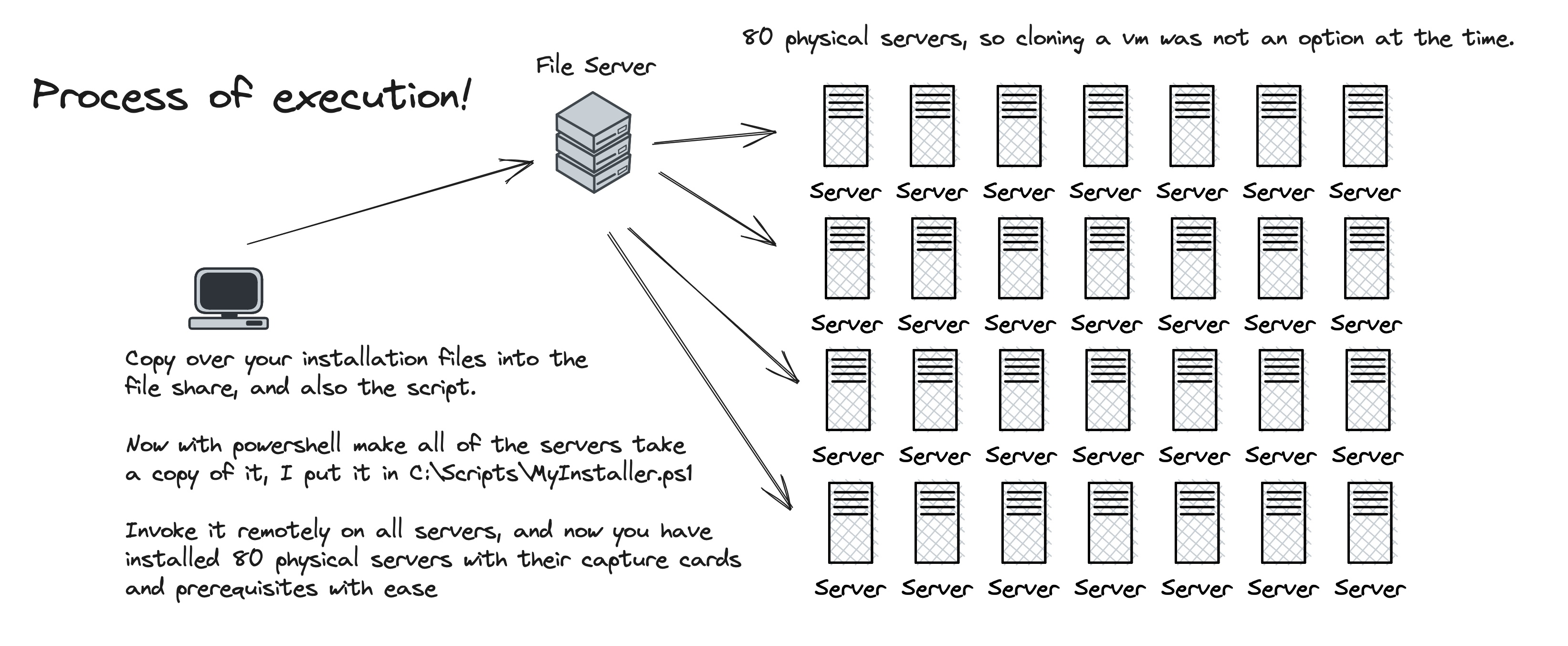
The question was simple enough to state and awkward to answer under a deadline:
How do you configure eighty servers when each one has to reboot mid-install and still finish correctly?
I wrote the setup in PowerShell. The script handled initial configuration, package installation, and the settings each machine needed for its role. The useful part was not that PowerShell could run commands. It was that the work could be split into stages that expected interruption.
Each stage did one coherent piece of work. When a stage needed a reboot, the script scheduled the next stage in Task Scheduler before restarting. After the reboot, Windows started the next stage on its own. The machine picked up where it had left off instead of waiting for me to log back in and remember which step came next.
That resume step was the whole design. Without it, automation stops being automation the moment a reboot clears your session. With it, I could start a box, walk to the next one, and trust the first to keep moving.
The result was not magic. It was consistency. Each server went through the same staged path, so the fleet matched itself more closely than a tired operator clicking through installers late at night ever would. Hours of manual work disappeared, and so did a whole class of “I thought I installed that” errors.
The script is a few years old now, so treat it as a historical artifact rather than a paste-ready playbook. Today I would reach for something closer to Ansible for the same job. At the time, PowerShell and Task Scheduler were what we had on Windows, and they were enough.
The answer to the opening question was not a smarter installer wizard. It was a process that could survive its own reboots, eighty times in a row, without me standing in the way.