
Some services love borders.
Some devices pretend not to care
Until they’re denied at the wrong border.
But if IP is identity,
And routing is a mask…
Then what if we wore the right mask
At just the right time?
For years, my parents watched streaming services through my accounts. I did not use them very often, only now and then, while they used them enough for the subscription to be genuinely useful. It was a simple family arrangement. I paid for the account, and I had decided that sharing it with them made more sense than leaving it mostly untouched.
Then a streaming service decided that one account should mean one home.
Nothing had changed between us. My parents were still my parents, sitting in front of the same television. Yet the service had begun treating their home as the wrong home.
That angered me more than I expected. It was not only about losing access to something I paid for. I had made a small, ordinary decision about how something in my life should be used, and a company had replaced that decision with its own definition of a household.
My first reaction was not especially diplomatic. If the restriction depended on where the television appeared to be on the internet, then perhaps the network could answer it.
The service had reduced the idea of home to the route taken by a packet. Routes, fortunately, were something I could change.
One television towards a different road
I did not want to put my parents’ whole network behind a commercial VPN. That would have traded one inconvenience for several new ones.
I needed something narrower. Only the television should take the longer road. Everything else in their home should continue as before.
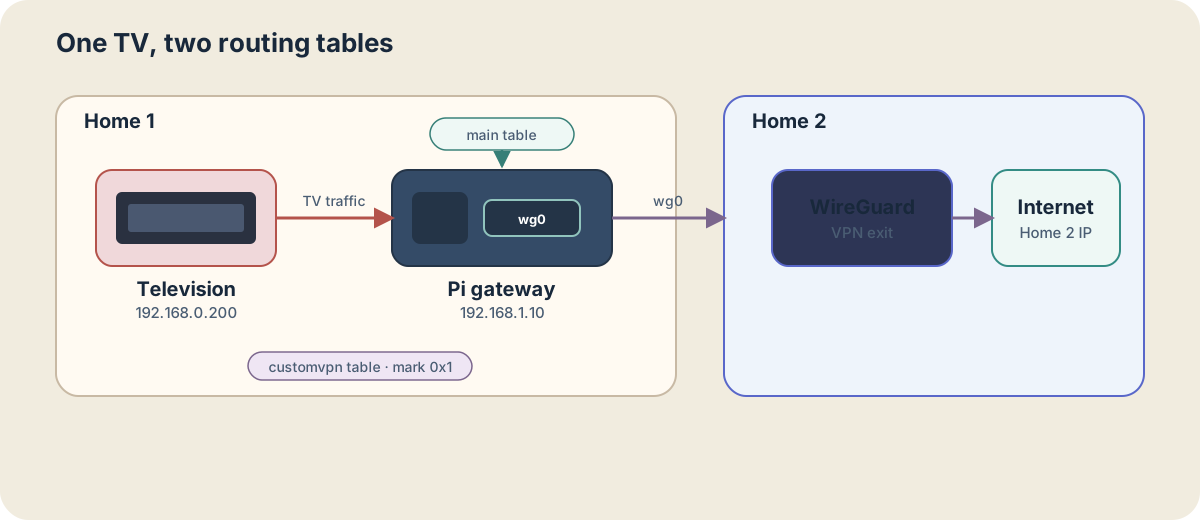
The answer was a Raspberry Pi, a WireGuard tunnel between our homes, and a routing rule that recognized the television by its fixed local address. When the TV sent traffic, the router handed it to the Pi. The Pi carried it through WireGuard and out through my connection. Every other device kept using the normal route.
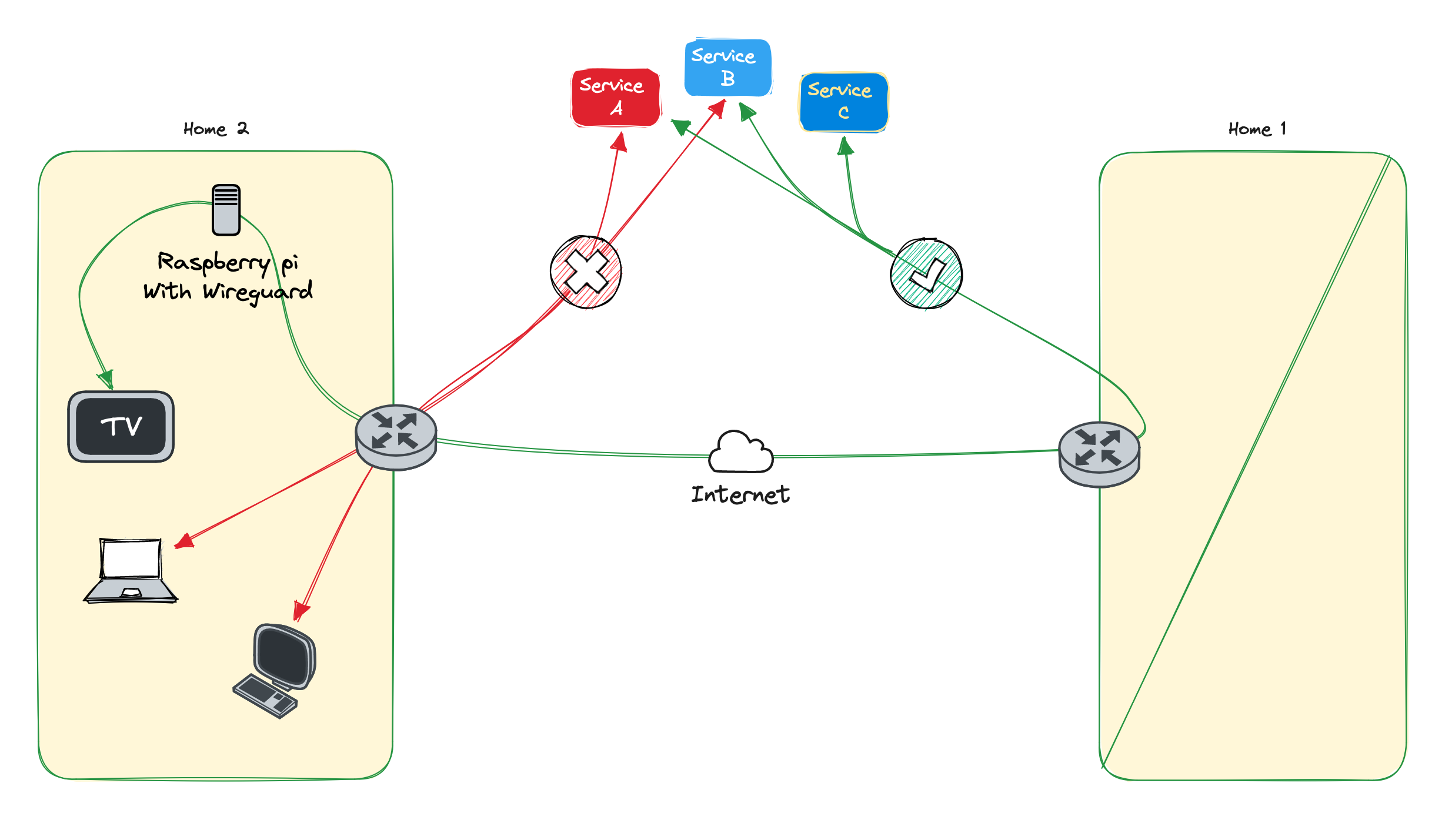
There was something satisfying about how little the finished solution announced itself. No new remote control, no ritual for my parents to remember, and no VPN application fighting with the television. They switched it on and chose what they wanted to watch. The screen simply played again.
There was a little revenge in it, certainly, but not the loud kind. The best part was the ingenuity: the service drew its boundary using the network, so I changed the path through the network without disturbing anything around it.
Now this solution is long gone but this is the technical howto
This is the iptables and policy-routing setup I used at the time. The addresses and interface names describe my layout and must be adapted to another network. These commands change live routing and firewall state, so I would only apply them with local or fallback access to the router and Pi. The runtime rules also need the appropriate persistence mechanism to survive a reboot.
The two homes
| Device | IP Address | Location |
|---|---|---|
| Router | 192.168.0.1 | My parents’ home |
| TV | 192.168.0.200 | My parents’ home |
| Local network | 192.168.0.0/24 | My parents’ home |
| Raspberry Pi | 192.168.1.10 | My parents’ home, separate VLAN |
| WireGuard server | 1.2.3.4 (the remote ip) | My home, VPN endpoint |
The goal was to make the TV at 192.168.0.200 leave through the WireGuard endpoint at my home. Traffic from the television crossed the local network, entered wg0, and left through my internet connection. Other devices continued to use their ordinary gateway.
The WireGuard endpoint already provided IP forwarding and internet NAT. The rules below cover the device-specific path into that existing tunnel.
AllowedIPs = 0.0.0.0/0 tells WireGuard that its peer can carry any IPv4 destination. With wg-quick, it also triggers automatic default-route handling. The wg-quick manual explains that it infers routes from AllowedIPs and uses ip rule when one of those routes is a default route.
That means a single ip route listing does not describe the full-tunnel behavior. I also checked ip rule and kept permanent LAN reachability separate from routes that should exist only while wg0 was active.
Routing only the television to the Pi
On the router at my parents’ home, I created a separate routing table and marked packets from the television so only they would use it:
# Add this table definition once
echo "200 customvpn" >> /etc/iproute2/rt_tables

# Route local networks into the table
ip route add 192.168.0.0/24 dev br0 table customvpn
ip route add 192.168.1.0/24 dev br1 table customvpn

# Default gateway for the customvpn table
ip route add default via 192.168.1.10 dev br1 table customvpn

# Mark TV traffic
iptables -t mangle -A PREROUTING -s 192.168.0.200 -j MARK --set-mark 0x1

# Use routing table for marked packets
ip rule add from all fwmark 0x1 table customvpn

# Optional: disable reverse path filtering
echo 0 > /proc/sys/net/ipv4/conf/br1/rp_filter
The four parts each had one job:
| Component | Function |
|---|---|
customvpn table | A new routing table for isolated routing decisions |
iptables MARK | Identifies TV’s traffic so rules can apply only to it |
ip rule | Redirects marked packets via the new routing path |
rp_filter | Disables strict path validation to allow asymmetric routing |
If your Pi or VM is on the same VLAN as the TV, reverse path filtering might not need to be disabled.
Forwarding the traffic through WireGuard
The Raspberry Pi acted as a router between the LAN and the WireGuard tunnel:
# Enable IP forwarding
echo 1 > /proc/sys/net/ipv4/ip_forward

# Allow TV's traffic through the VPN
iptables -A FORWARD -i eth0 -s 192.168.0.200 -o wg0 -j ACCEPT

# Allow return traffic from VPN
iptables -A FORWARD -i wg0 -o eth0 -m state --state RELATED,ESTABLISHED -j ACCEPT

# Rewrite source IP to Pi's VPN IP for internet access
iptables -t nat -A POSTROUTING -s 192.168.0.200 -o wg0 -j MASQUERADE
| Direction | Interface | Action |
|---|---|---|
| TV → Pi → VPN | eth0 → wg0 | Forward and masquerade |
| VPN → Pi → TV | wg0 → eth0 | Accept if established |
DNS and isolation at the VPN endpoint
Some television apps use their own DNS destination instead of the resolver offered by the local network. At the VPN endpoint, I could redirect DNS traffic arriving through wg0 to my own resolver and prevent the tunnel from becoming a route into other private networks.
The redirect covered both UDP and TCP DNS:
# Redirect DNS to router or Pi-hole
iptables -t nat -A PREROUTING -i wg0 -p udp --dport 53 -j DNAT --to-destination 192.168.0.1:53
iptables -t nat -A PREROUTING -i wg0 -p tcp --dport 53 -j DNAT --to-destination 192.168.0.1:53
The matching forwarding rules allowed that DNS traffic before blocking access to private address ranges:
# Allow DNS over UDP and TCP
iptables -A FORWARD -i wg0 -p udp -d 192.168.0.1 --dport 53 -j ACCEPT
iptables -A FORWARD -i wg0 -p tcp -d 192.168.0.1 --dport 53 -j ACCEPT

# Block access to private networks
iptables -A FORWARD -i wg0 -d 10.0.0.0/8 -j DROP
iptables -A FORWARD -i wg0 -d 172.16.0.0/12 -j DROP
iptables -A FORWARD -i wg0 -d 192.168.0.0/16 -j DROP

# Drop traffic to the VPN server/router itself
iptables -A INPUT -i wg0 -d [VPN server IP] -j DROP
[VPN server IP] is a placeholder and must be replaced before using that final rule. Rule order matters because the DNS allowance must be evaluated before the broader private-network drops.
The details that required the most care were reverse path filtering, rule persistence after reboot, and the lifetime of routes attached to wg0. I kept local management routes independent from the tunnel, then tested the television, ordinary devices, DNS, and remote access separately. That narrowness was what made the solution useful: when the tunnel stopped, it did not have to take the rest of the network with it.
Buy Me a Coffee